
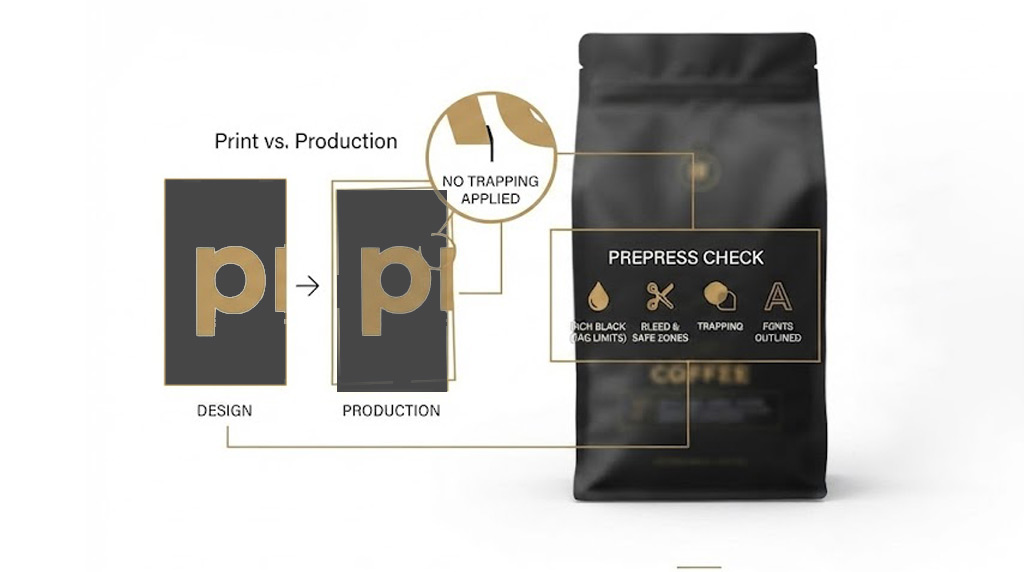
Why a visually approved packaging file can still fail in production.
Most packaging files labeled “Print-Ready” are not actually ready for manufacturing.
As a Packaging Prepress Expert, I see this mistake far more often than I should.
The design looks perfect on screen.
The client approves it.
The PDF is exported.
Everyone assumes it’s ready for print.
But production doesn’t care how beautiful your artwork looks.
It cares whether it can be manufactured consistently, accurately, and without costly mistakes.
This is where many packaging projects run into unexpected problems.
Graphic designers focus on visual communication.
Printing companies focus on physics, chemistry, machine tolerances, and manufacturing constraints.
That gap between design approval and production reality is exactly where prepress becomes essential.
Here are four common reasons why a file labeled “Print-Ready” may still cause production issues.
01 — The “Rich Black” Trap
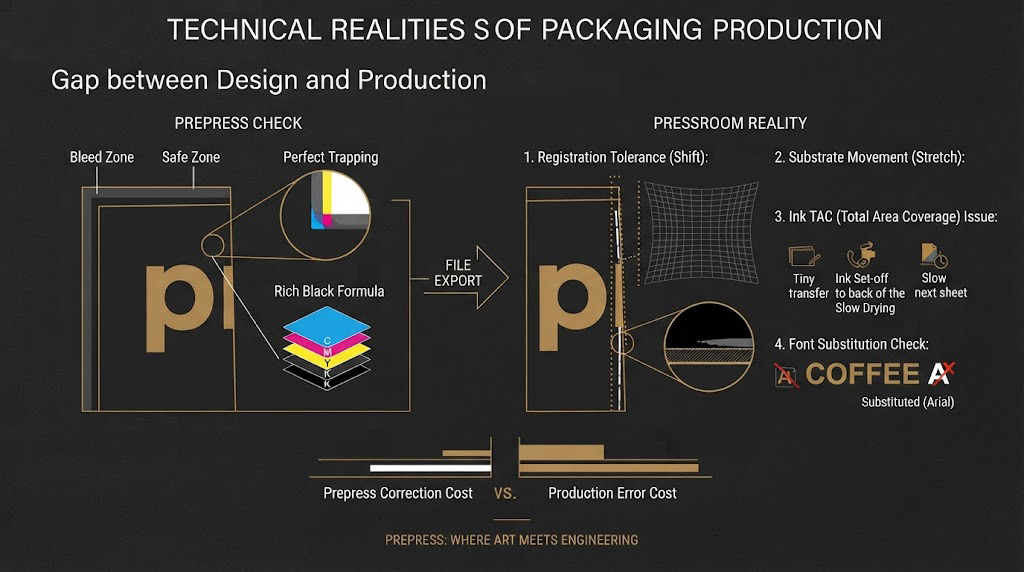
Using 100/100/100/100 CMYK to create a deep black results in 400% Total Area Coverage (TAC).
On flexible coffee packaging or premium tea cartons, excessive ink coverage can lead to:
- Drying problems
- Ink set-off
- Smearing
- Production delays
A production-ready file uses an optimized rich black formula based on the printing process and substrate.
Prepress Check: Total ink coverage should always be evaluated against the specifications of the printing process and substrate.
02 — Missing Bleeds & Unsafe Margins
Packaging is trimmed, folded, and sealed at high production speeds.
If artwork doesn’t extend beyond the dieline to provide sufficient bleed, unwanted white edges can appear after trimming.
If important text sits too close to folds or cut lines, critical information may be partially removed or compromised during production.
Prepress Check: Bleed and safe zones should be reviewed against the actual dieline before artwork approval.
03 — No Trapping Applied
Printing presses are mechanical systems.
Paper stretches.
Flexible films move.
Registration can shift slightly during production.
Without proper trapping, even a small movement can create visible white hairlines between adjacent colors — something customers notice immediately on premium packaging.
Prepress Check: Trapping should be evaluated according to the printing process, substrate, and registration tolerances.
04 — Fonts Not Outlined or Embedded
Imagine your premium coffee packaging being printed in Arial.
It happens more often than you think.
If fonts aren’t properly outlined or embedded, the printer’s system may substitute them with another typeface, changing the appearance of your brand without anyone noticing until production.
Prepress Check: Font handling should be verified before the final production PDF is approved.
Why This Matters
A packaging file is not production-ready simply because it was exported as a PDF.
It becomes production-ready only after a proper technical prepress review.
That’s the difference between creating artwork and preparing packaging for manufacturing.
The Value of a Packaging Prepress Review
Before committing thousands of dollars to a production run, a professional prepress review can identify technical risks such as:
✓ Ink coverage issues
✓ Bleed and safety margin problems
✓ Trapping errors
✓ Font compatibility
✓ Color separation issues
✓ Dieline inconsistencies
Fixing these issues before printing is significantly less expensive than correcting them after production.
Final Thought
Good packaging design attracts attention.
Good prepress protects your investment.
I help coffee and tea brands reduce production risks before they become production costs.
A Question for Packaging Teams
Have you ever received a file labeled “Print-Ready” that still caused production problems?
I’d love to hear about your experience.
Why a visually approved packaging file can still fail in production.
Most packaging files labeled “Print-Ready” are not actually ready for manufacturing.
As a Packaging Prepress Expert, I see this mistake far more often than I should.
The design looks perfect on screen.
The client approves it.
The PDF is exported.
Everyone assumes it’s ready for print.
But production doesn’t care how beautiful your artwork looks.
It cares whether it can be manufactured consistently, accurately, and without costly mistakes.
This is where many packaging projects run into unexpected problems.
Graphic designers focus on visual communication.
Printing companies focus on physics, chemistry, machine tolerances, and manufacturing constraints.
That gap between design approval and production reality is exactly where prepress becomes essential.
Here are four common reasons why a file labeled “Print-Ready” may still cause production issues.
01 — The “Rich Black” Trap
Using 100/100/100/100 CMYK to create a deep black results in 400% Total Area Coverage (TAC).
On flexible coffee packaging or premium tea cartons, excessive ink coverage can lead to:
- Drying problems
- Ink set-off
- Smearing
- Production delays
A production-ready file uses an optimized rich black formula based on the printing process and substrate.
Prepress Check: Total ink coverage should always be evaluated against the specifications of the printing process and substrate.
02 — Missing Bleeds & Unsafe Margins
Packaging is trimmed, folded, and sealed at high production speeds.
If artwork doesn’t extend beyond the dieline to provide sufficient bleed, unwanted white edges can appear after trimming.
If important text sits too close to folds or cut lines, critical information may be partially removed or compromised during production.
Prepress Check: Bleed and safe zones should be reviewed against the actual dieline before artwork approval.
03 — No Trapping Applied
Printing presses are mechanical systems.
Paper stretches.
Flexible films move.
Registration can shift slightly during production.
Without proper trapping, even a small movement can create visible white hairlines between adjacent colors — something customers notice immediately on premium packaging.
Prepress Check: Trapping should be evaluated according to the printing process, substrate, and registration tolerances.
04 — Fonts Not Outlined or Embedded
Imagine your premium coffee packaging being printed in Arial.
It happens more often than you think.
If fonts aren’t properly outlined or embedded, the printer’s system may substitute them with another typeface, changing the appearance of your brand without anyone noticing until production.
Prepress Check: Font handling should be verified before the final production PDF is approved.
Why This Matters
A packaging file is not production-ready simply because it was exported as a PDF.
It becomes production-ready only after a proper technical prepress review.
That’s the difference between creating artwork and preparing packaging for manufacturing.
The Value of a Packaging Prepress Review
Before committing thousands of dollars to a production run, a professional prepress review can identify technical risks such as:
✓ Ink coverage issues
✓ Bleed and safety margin problems
✓ Trapping errors
✓ Font compatibility
✓ Color separation issues
✓ Dieline inconsistencies
Fixing these issues before printing is significantly less expensive than correcting them after production.
Final Thought
Good packaging design attracts attention.
Good prepress protects your investment.
I help coffee and tea brands reduce production risks before they become production costs.
A Question for Packaging Teams
Have you ever received a file labeled “Print-Ready” that still caused production problems?
I’d love to hear about your experience.